The MeshCore KISS Modem: More Than Just a Node
Since version 1.16.0, the firmware flasher has offered a new role for most boards: the "KISS Radio Modem." This term has caused some confusion within the community. This article clarifies what the KISS Modem is, what it's for, and when it should be used.
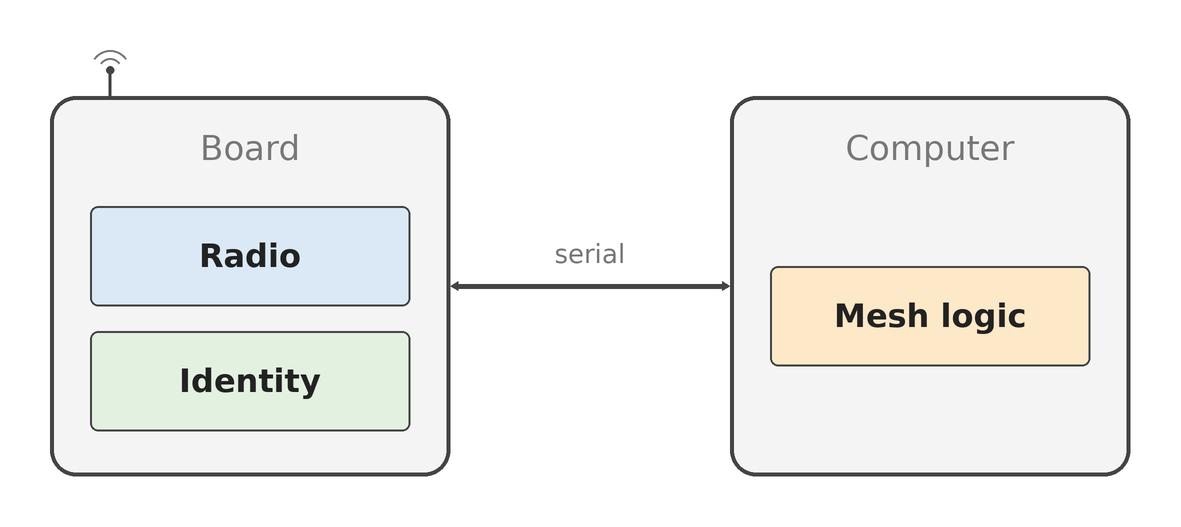
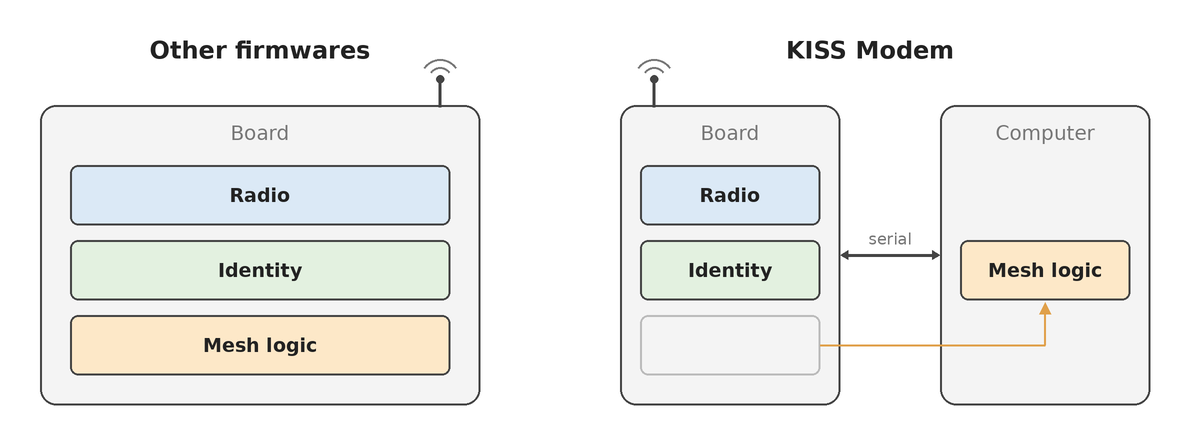
At its core, the KISS Modem utilizes the same MeshCore firmware and radio hardware as other roles. The crucial difference lies in how you interact with the board: instead of an app, you open a serial port and communicate using the KISS protocol. KISS stands for "Keep It Simple, Stupid" and is a straightforward, proven protocol used in amateur radio for decades to communicate between computers and packet modems (TNCs). With the KISS Modem, all the logic for sending and receiving data shifts from the MeshCore device to the host computer. The MeshCore device thus acts more like a pure LoRa dongle.
Who is the KISS Modem for?
Most users who want to chat using their MeshCore device via a smartphone app do not need the KISS Modem. For this purpose, the standard companion firmware is the correct choice.
The KISS Modem is primarily aimed at developers and technically savvy users who want to build gateways or custom services on a full-fledged computer. A prominent example is OpenHop (formerly pyMC), which can use a KISS Modem as its radio interface.
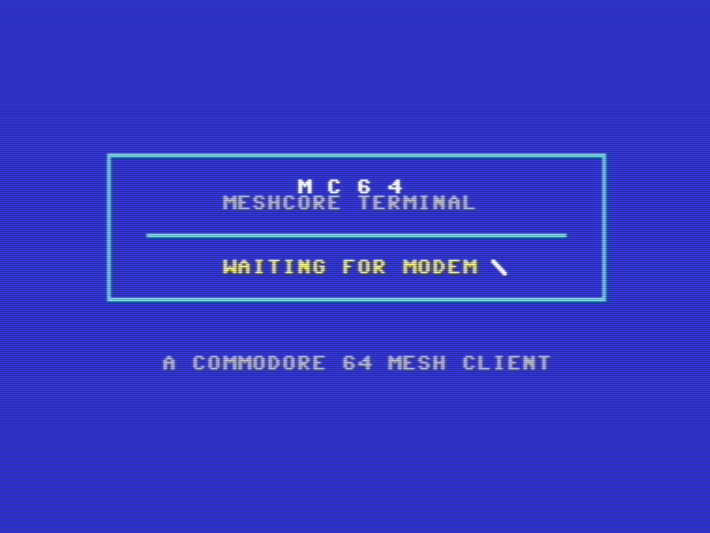
However, its application is not limited to modern computers. An interesting example shows a Commodore 64 connected via the user port at 600 baud. The C64 handles packet generation and screen output, while the modem manages LoRa communication and AES encryption.
The KISS Modem is also useful for developers who want to analyze or manipulate MeshCore packets from a laptop using any programming language. It allows direct access to radio communication without the detour of more complex firmware implementing its own logic. While the companion firmware can also provide raw packets, the KISS Modem offers more complete and direct control over the radio layer.
What is KISS?
As mentioned, KISS is an acronym for "Keep It Simple, Stupid." It is a framing protocol that has been used in amateur packet radio since the 1980s for communication between computers and TNCs. MeshCore adopted this protocol because it is uncomplicated and libraries for it exist in many programming languages.
You can think of KISS as an envelope, where the actual MeshCore packet is the letter inside.
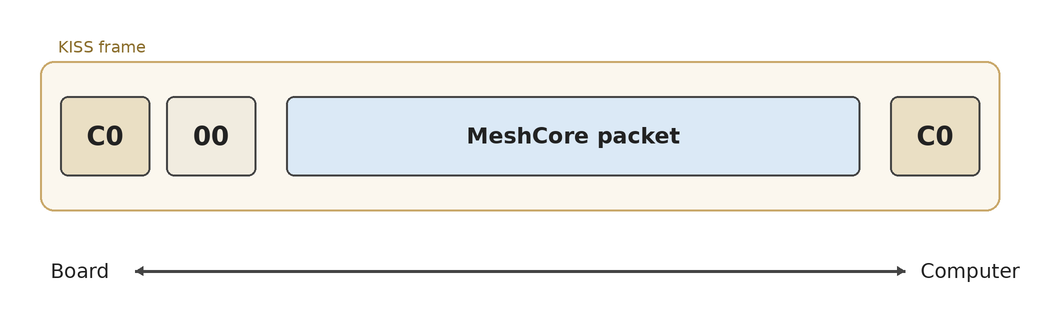
A KISS frame is delimited by a C0 byte at both ends, a type byte, and the actual packet in between. This is why any KISS client (like Direwolf or APRSdroid) can drive the modem and send raw data over the radio module. However, these clients do not interpret the content of MeshCore packets and cannot integrate them into the mesh network.
In addition to the plain KISS protocol, the firmware adds MeshCore-specific information such as radio settings, signal reports, battery status, and cryptography via standardized KISS commands that generic KISS clients ignore.
The Board's Responsibilities
While the board in KISS Modem mode does not handle mesh logic, it still performs a number of important functions: it sends and receives raw MeshCore packets over LoRa. Received packets are forwarded over the serial interface exactly as they were received "over the air," including signal strength (RSSI) and signal-to-noise ratio (SNR). Further processing is then up to the host software.
The host computer configures radio parameters such as frequency, bandwidth, spreading factor, coding rate, and transmit power. Furthermore, information such as battery voltage, noise floor, packet counters, and sensor values (if available) can be queried. The board can also estimate the airtime of a packet based on current settings. The full list of available commands can be found in the protocol documentation.
It is important to note that none of these radio settings survive a reboot. Aside from the board's key pair, nothing is saved. Therefore, the host software must reconfigure the radio parameters each time it connects.
The KISS Modem also implements "Listen Before Talk" (LBT) to avoid collisions with other radio traffic. It also processes only one packet at a time, signaling when a packet has been successfully sent before accepting another.
Each board generates its own key pair upon first boot, stored in flash memory. The private key cannot be read out. If you want to use the board's identity on the mesh, you can ask the board to sign data or perform key exchanges for you. It can also perform encryption, decryption, and verification with keys provided by the host. Alternatively, you can ignore these functions entirely. The board sends the bytes given to it without checking them. A host that manages its own key pair can thus generate valid packets without ever touching the board's cryptography—an approach taken by OpenHop. The aforementioned Commodore 64, on the other hand, delegates all AES encryption and decryption to the modem due to its limited processing power.
What the KISS Modem does not provide are mesh logic such as routing, repeating, chat functions, or a room server. All these functions must be implemented on the host side.
Flashing the Firmware
Flashing the KISS Modem firmware is identical to flashing any other role:
- Go to flasher.meshcore.io.
- Select your board.
- Choose the "KISS Radio Modem" role.
- Flash the firmware.
- Open the board's serial port at 115200 baud, 8N1, using software that understands MeshCore.
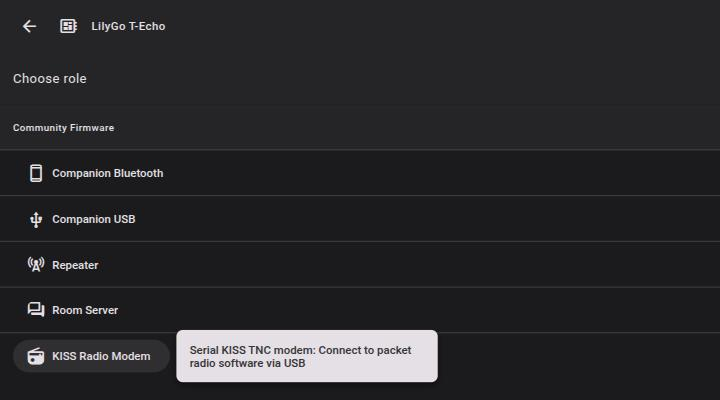
The last step involves the actual work. For most boards, the serial port is the USB one. There is a compile-time option (KISS_UART_RX and KISS_UART_TX) to move the serial communication to dedicated UART pins, which is useful, for example, for direct connection to a Raspberry Pi. However, this would require compiling the firmware yourself.
If you prefer not to implement the serial communication yourself, OpenHop already has this functionality integrated. If you want to develop your own solution, all details on serial communication can be found in the KISS Modem protocol documentation, and the packet format in the corresponding documentation page.
Where to Start
- Flasher: https://flasher.meshcore.io
- Protocol documentation: https://docs.meshcore.io/kiss_modem_protocol
- Packet format: https://docs.meshcore.io/packet_format
- OpenHop: https://github.com/openhop-dev/openhop_repeater