The official MeshCore developer blog, blog.meshcore.io, has announced the release of Ripple UI firmware version 12.3. This update introduces a range of improvements and bug fixes, specifically enhancing user experience and functionality for certain devices within the MeshCore network.
Key new features include:
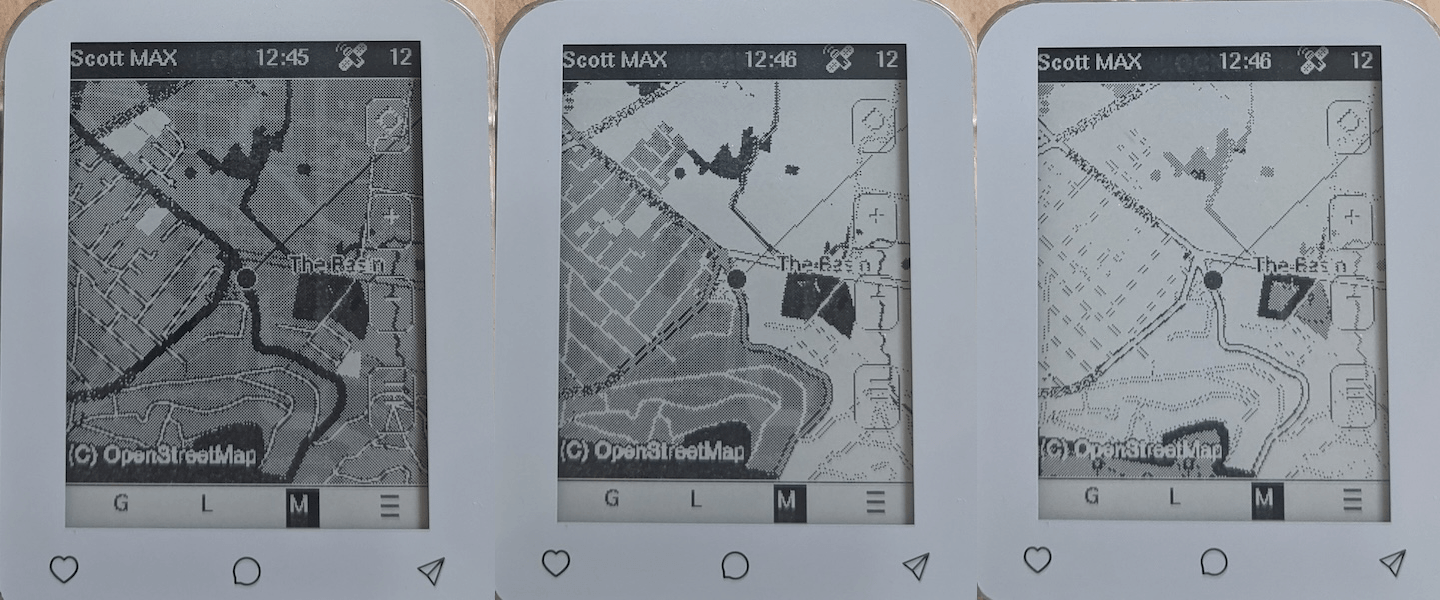
- Support for dithering of color map tilesets on ePaper devices (Pro/Max/T5). Dithering is a technique used to simulate a wider range of colors or shades on displays with limited color depth, such as ePaper, by strategically arranging pixels.
- Various stability improvements achieved by fixing crash bugs.
- The ability to download map tiles over WiFi.
- Support for two new hardware devices.
- A GPS-based compass arrow display.
- Fixes for multi-byte path processing.
ePaper Map Functionality
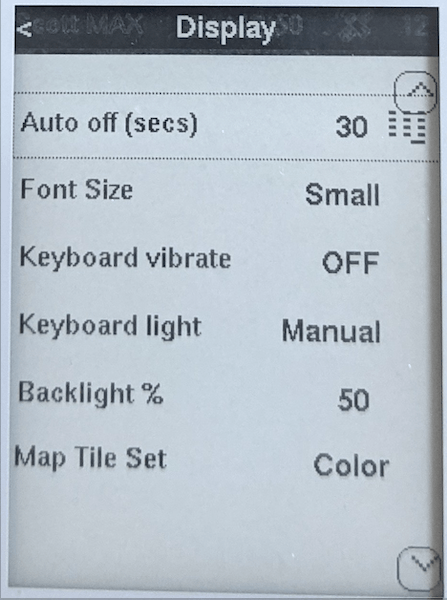
For devices equipped with an ePaper display, such as the T-Deck Max/Pro and T5 Pro, the new firmware now supports switching between map tile sets. Users can choose to display dedicated black and white map tiles, located in the /tiles-bw folder, or standard color OpenStreetMap (OSM) tiles found in the /tiles folder.
The color tiles are now dithered for display on ePaper screens, yielding surprisingly good results. As the color representation through dithering may not always be ideal, the contrast threshold value used by the algorithm can be manually adjusted by pressing ALT+1 to ALT+9. This allows for fine-tuning of the display based on individual preferences and ambient light conditions.
The option to switch map tile sets is located within the new Display preferences screen:
Crash Fixes
In the previous version, three distinct bugs were identified that could lead to intermittent crashes. These issues were related to multi-byte paths and the rxlog function within the Diagnostics screen. According to the developers, version 12.3 is expected to be significantly more stable, with these crashes now resolved.
Map Tile Download via WiFi
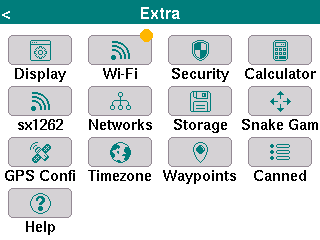
A significant new feature is the integration of a dedicated WiFi configuration screen, enabling the download of map tiles. This option is accessible from the Extra menu on the home screen:
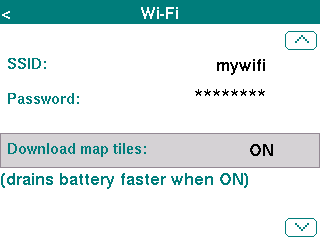
After saving the changes (ENTER), a device reboot is required for the WiFi settings to take effect. While slightly cumbersome, this step is crucial for minimizing battery drain by ensuring WiFi is off during boot when not actively used.
Once WiFi downloads are enabled, an orange dot will appear in the menu, indicating a successful connection:
It is important to note that for ePaper devices, the map tile download feature only applies to the color tile set option. With tile download enabled, map tiles are downloaded (and saved to the SD card) on demand as the user zooms or pans. Bulk tile downloading is not supported at this time.
New Device Support
MeshCore extends its compatibility to two additional hardware platforms:
- Seeed MeshPager X2
- Seeed WIO Tracker L2 Pro
GPS Compass
The new firmware introduces a blue direction arrow that is rendered on the display when the device is in motion. For the new devices (X2, L2) as well as the M9, which feature a digital compass, this arrow is displayed even when the device is stationary and updates as the device is rotated (provided it is held horizontally).
The digital compass requires calibration. A new "Calibrate Compass" option is now available in the Extra menu on the home screen.
Firmware Download
The latest firmware version 12.3 is available for download as usual via the MeshCore Flasher.